
5 Best Laptops for Nursing Students in 2026: Top Picks for Every Budget

I’ve been using, buying, and testing laptops for the past 15 years, and as a former science student I know exactly what a laptop goes through in a program like nursing. Long days that outlast your battery. A bag already heavy before the laptop goes in. Online tests where a freeze is not an inconvenience, it’s a crisis.
That’s why this guide doesn’t start with a ranking. The best laptop for nursing school is the one that runs your program’s required software, lasts a full day away from an outlet, and stays light on your shoulder. I verified every pick against its live Amazon US configuration in October 2026, because the same model name can hide very different machines.
My target for most students: 16GB RAM, 512GB SSD, under 3 pounds, and a platform your school officially supports. Here’s what fits how you’ll actually study.
Quick Verdict: What Is the Best Laptop for Nursing Students?
My best overall pick is the ASUS Zenbook 14 OLED because it combines a portable 2.82-pound chassis, 16GB RAM, 512GB SSD, a sharp OLED touchscreen, strong Intel Core Ultra performance, Wi-Fi 7, and useful ports without becoming a bulky workstation. The Acer Aspire Go 15 is the value pick, Lenovo Yoga 9i is the best premium 2-in-1, the 13-inch MacBook Air M5 is the best macOS option if your program supports it, and the HP OmniBook 7 Aero is the easiest to carry every day.
Key Takeaways
A nursing laptop should be chosen around program compatibility first and product ranking second. A beautiful machine is a bad purchase if a required exam, simulation, or clinical application will not run on it.
- Check your nursing program’s OS, testing software, and hardware requirements before buying.
- Aim for 16GB RAM for smoother multitasking and study sessions.
- Choose a 512GB SSD for enough space for coursework and applications.
- Prioritize lightweight 13- or 14-inch laptops over gaming performance.
- Remember that real-world battery life varies with usage and settings.
- Choose a 2-in-1 only if touchscreen and pen support are useful to you.
- Verify macOS compatibility with your nursing program’s software and exams.
- Check the exact laptop specifications, seller, condition, and warranty before ordering.
For most nursing students, I would rather buy a well-balanced midrange laptop with strong battery life and a good keyboard than spend the same money on a faster machine that is heavy, loud, or poorly matched to required software.
What Nursing Students Should Look for in a Laptop
I start with the nursing program, not Amazon. Some schools publish explicit laptop requirements, supported operating systems, browser versions, lockdown-exam software, webcam rules, or minimum memory and storage. Those requirements override any general recommendation in this guide.
After compatibility is confirmed, I rank the everyday experience: display comfort for long reading sessions, keyboard quality for papers and care plans, webcam and microphone quality for remote classes, weight for commuting, battery behavior, ports, warranty, and the exact memory/storage configuration.
- 1. Confirm the operating system. Ask whether Windows, macOS, and ChromeOS are fully supported. If the answer is vague, a current Intel- or AMD-based Windows laptop is usually the conservative compatibility choice.
- 2. Check required software by name. Look up exam proctoring, simulation, EHR training, virtual classroom, VPN, statistics, anatomy, and school security software rather than assuming “web based” means every platform works identically.
- 3. Set a realistic portability target. Students carrying a laptop daily should pay attention to weight plus charger weight, not just screen size.
- 4. Buy enough RAM and storage once. Many thin laptops solder RAM to the board, so an 8GB model cannot always be upgraded later.
- 5. Check warranty and return protection. A laptop is a school tool. A clear return window and dependable warranty can matter more than a small benchmark difference.
If your school publishes only a vague “computer required” statement, email its IT department or nursing program office with the exact model and operating system before purchasing. That one step can prevent an expensive compatibility mistake.
Laptop Features That Matter Most for Nursing School

Specifications only become useful when they connect to a real task. These are the features I prioritize for nursing students and why each one changes the day-to-day experience.
Operating System and Software Compatibility
The operating system is the first filter because a laptop that cannot run required software is unusable no matter how good its hardware is. Windows offers the broadest legacy desktop and peripheral compatibility, while macOS is excellent when the school confirms support; ChromeOS is best only for programs that are genuinely browser-first.
16GB RAM for Multitasking
I target 16GB because nursing coursework can involve video calls, Office apps, many browser tabs, large PDFs, research databases, messaging, and exam software at the same time. 8GB can still work for light use, but it gives less headroom over a multi-year program.
512GB SSD Storage
A 512GB SSD is large enough for most students without pushing the price unnecessarily high. It also leaves room for applications, offline files, recordings, photos, and future coursework while keeping the machine responsive.
Current Midrange Processor
You do not need workstation performance for normal nursing coursework. A current Core Ultra, modern Ryzen, Apple M-series chip, or similar midrange processor is more than enough for research, Office, Zoom or Teams, PDFs, light image work, and everyday multitasking.
Readable 13- to 15-Inch Display
A 13- or 14-inch screen is easier to carry, while 15 inches gives more room for side-by-side documents and spreadsheets. I prioritize a sharp IPS or OLED panel, comfortable scaling, usable brightness, and a 16:10 aspect ratio when possible because vertical space helps with documents.
Comfortable Keyboard and Trackpad
Nursing students type papers, discussion posts, notes, care-plan work, and emails constantly. A comfortable keyboard with predictable key travel and a precise trackpad matters more over a semester than a small CPU advantage.
Realistic Battery Life
Manufacturer battery figures are useful for comparison, but they are measured under controlled conditions. Video calls, high brightness, background apps, browser-heavy work, and weak Wi-Fi can cut runtime, so I also consider charger size and how easy the laptop is to top up between classes.
Weight and Build Quality
A few tenths of a pound matter when the laptop is carried every day with textbooks, water, chargers, and clinical gear. I prefer roughly 2.2 to 3.3 pounds for a highly portable school laptop, but I will accept more weight if the student wants a larger 15-inch screen and lower price.
Webcam and Microphone
A 1080p-class webcam is useful for virtual lectures, office hours, interviews, telehealth simulations, or proctored sessions. Good microphone processing is equally important because poor audio can make a strong webcam irrelevant.
Ports and Wireless Connectivity
USB-C charging is useful, but I still value at least one USB-A port or a reliable adapter for older peripherals. HDMI can save time in classrooms, while Wi-Fi 6, 6E, or 7 provides modern wireless support where the network can use it.
Touchscreen and Pen Support
Touch and pen support can be genuinely useful for annotating slides, handwriting diagrams, or studying anatomy. I treat it as an optional workflow feature rather than a nursing-school requirement because it can add cost, weight, glare, and hinge complexity.
Warranty, Seller, and Repairability
The laptop has to survive several semesters, so I check who actually sells the Amazon configuration, whether memory is soldered, how storage is serviced, and what the warranty covers. Marketplace upgrades can change the original factory configuration and warranty responsibility.
Recommended Laptop Specifications for Nursing Students in 2026
I would not chase the highest number in every category. The goal is a balanced laptop that stays comfortable and compatible through several years of school without paying for gaming-class graphics or workstation hardware that typical nursing coursework does not use.

My target configuration is 16GB RAM and 512GB SSD, then I adjust screen size and form factor based on how often the student travels. The requirements below are buying targets, not universal school rules, so your program should always take priority.
- Minimum I would consider for a new general-purpose laptop. Modern supported OS, 8GB RAM, 256GB SSD, current mainstream CPU, 1080p-class display and webcam.
- Configuration I recommend for most students. 16GB RAM, 512GB SSD, current Intel/AMD/Apple platform, 13- to 15-inch IPS/OLED display, good keyboard, USB-C charging, and modern Wi-Fi.
- Spend above that only for a reason. Choose 32GB RAM, 1TB storage, OLED touch, premium 2-in-1 design, or extra ports only when they solve a specific study or ownership need.
The table gives a quick reference after the explanation above. It is intentionally short so it does not turn the article into a specification dump.
| Feature | My 2026 Target | Why It Matters |
|---|---|---|
| Operating system | Current Windows 11 or supported macOS | Follow school compatibility requirements first |
| Memory | 16GB recommended | Better headroom for multitasking and long-term use |
| Storage | 512GB SSD recommended | Comfortable local storage without unnecessary cost |
| Processor | Current mainstream Core Ultra / Ryzen / Apple M-series | More than enough for normal coursework and video calls |
| Display | 13–15 in, 1920×1200-class or better | Readable documents and easier side-by-side work |
| Weight | About 2.2–3.3 lb for frequent carrying | Reduces daily bag weight |
| Webcam | 1080p-class or better preferred | Useful for remote classes and proctoring |
| Ports | USB-C plus useful legacy connection or adapter | Avoids last-minute dongle problems |
| Wireless | Wi-Fi 6 or newer | Modern campus/home network support |
| Battery | Prioritize proven all-day-class usability | Advertised maximums vary in real use |
If a program explicitly requires more memory, storage, a particular processor architecture, or Windows-only software, follow that requirement even when it differs from my general target.
How I Test Laptops at GearVerdicts
I personally test laptops hands-on when I have the unit available, and I do not label a research-only recommendation as hands-on. When a specific configuration is not physically on my desk, I verify the manufacturer specification, exact retailer configuration, seller details, warranty, current availability, and documented behavior, then compare it against laptops I have used in the same class.
For student laptops, I care much more about sustained everyday usability than one benchmark run. I work with dozens of browser tabs, Office documents, large PDFs, video calls, Wi-Fi transfers, sleep and wake cycles, external displays, USB accessories, long typing sessions, and battery drain at realistic brightness because that is closer to the way a nursing student will use the machine.
- Keyboard and trackpad. I type for extended sessions and check key feel, layout, touchpad precision, palm rejection, and whether the deck becomes uncomfortable.
- Display usability. I read long documents, compare text at different scaling levels, check reflections and brightness, and look for comfortable side-by-side workspace.
- Battery and charging. I consider real mixed-use drain, charger size, USB-C charging behavior, and how quickly the machine recovers useful runtime.
- Webcam, microphone, and speakers. I use video calls and recordings instead of rating the camera from megapixels alone.
- Ports and connectivity. I connect common USB peripherals, external displays, storage, Bluetooth devices, and modern Wi-Fi rather than assuming the port list tells the full story.
- Thermals and responsiveness. I check whether the laptop stays comfortable and responsive through sustained multitasking, updates, video calls, and charging.
- Ownership details. I verify exact RAM/storage configuration, seller, return terms, upgrade limitations, bundled accessories, and warranty responsibility before recommending a listing.
You can read more about GearVerdicts’ editorial and evidence standards, including how we distinguish hands-on observations from documented research.
Best Laptops for Nursing Students at a Glance

I selected these five because each solves a different nursing-student problem rather than because one specification is highest. The ASUS is the balanced Windows pick, Acer prioritizes budget and screen size, Lenovo adds premium pen-enabled 2-in-1 flexibility, Apple is the best macOS choice when compatibility is confirmed, and HP prioritizes minimum carrying weight.
Amazon U.S. listings for these exact or clearly identified configurations were live when checked in October 2026. Stock, seller, configuration, and price can change quickly, so use the Amazon link to verify the live listing before publishing or buying.
- Best overall: ASUS Zenbook 14 OLED UX3405CA. Best balance of portability, OLED display, modern Intel performance, 16GB RAM, 512GB SSD, ports, and Windows compatibility.
- Best budget: Acer Aspire Go 15 AG15-42P-R3NB. A practical 15.6-inch Windows option with Ryzen 7, 16GB RAM, and 512GB SSD for everyday coursework.
- Best 2-in-1: Lenovo Yoga 9i 2-in-1 Aura Edition. Premium OLED touchscreen, pen support, 32GB RAM, and a 360-degree hinge for annotation-heavy workflows.
- Best MacBook: Apple MacBook Air 13-inch M5. Portable M5 laptop with 16GB memory and 512GB SSD, but only after the program confirms macOS support.
- Best lightweight: HP OmniBook 7 Aero 13. Around 2.2 pounds with Ryzen AI 5, 16GB RAM, 512GB SSD, and a 13.3-inch 2K-class display.
The comparison table comes after the category explanation so it works as a final shortcut rather than replacing the reasoning behind each pick.
| Model | Best For | Processor | Memory / SSD | Display | Weight |
|---|---|---|---|---|---|
| ASUS Zenbook 14 OLED | Best overall | Core Ultra 7 255H | 16GB / 512GB | 14 in OLED touch | 2.82 lb |
| Acer Aspire Go 15 | Best budget | Ryzen 7 5825U | 16GB / 512GB | 15.6 in FHD IPS | Larger chassis |
| Lenovo Yoga 9i 2-in-1 | Best 2-in-1 | Core Ultra 7 258V | 32GB / 2TB listing* | 14 in 2.8K OLED touch | 2.91 lb |
| MacBook Air 13 M5 | Best MacBook | Apple M5 | 16GB / 512GB | 13.6 in 2560×1664 | Portable |
| HP OmniBook 7 Aero 13 | Best lightweight | Ryzen AI 5 340 | 16GB / 512GB | 13.3 in 1920×1200 IPS | ~2.2 lb |
1. ASUS Zenbook 14 OLED UX3405CA – Best Overall Laptop for Nursing Students
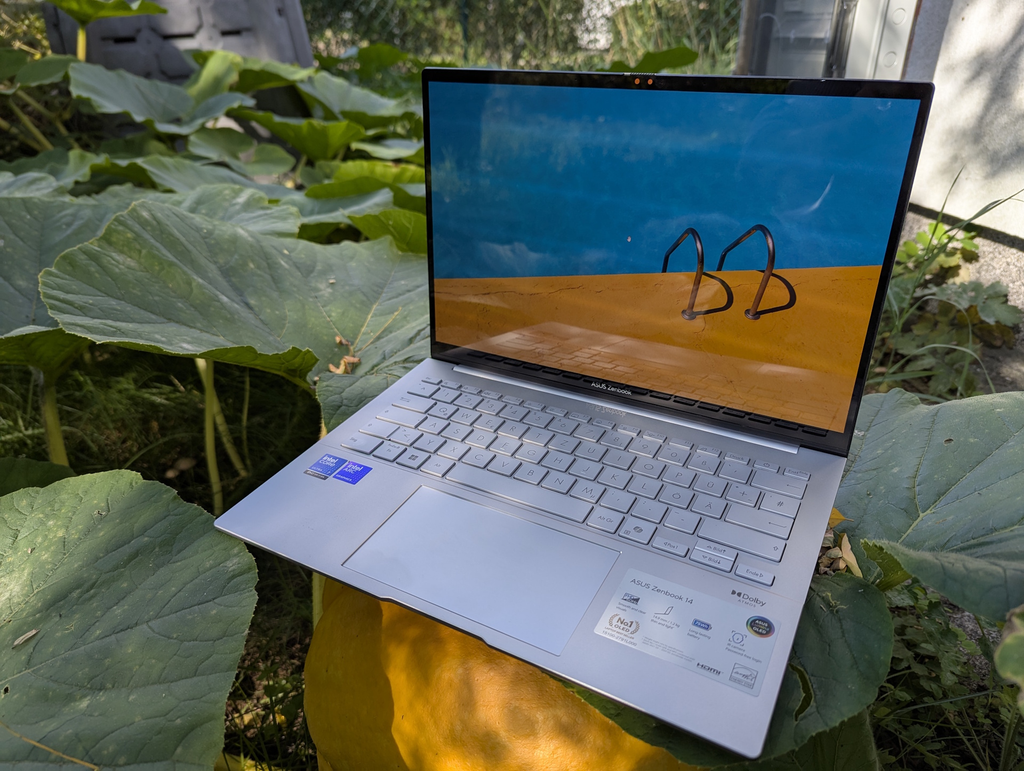
The ASUS Zenbook 14 OLED is my strongest all-around Windows recommendation because it balances portability and productivity unusually well. The Core Ultra 7 255H configuration pairs 16GB of LPDDR5X memory with a 512GB PCIe SSD, while the 14-inch 16:10 OLED touchscreen gives documents, diagrams, videos, and side-by-side coursework more vertical room than a traditional 16:9 panel.
For a nursing student, the biggest advantage is that it stays portable without stripping away useful connectivity. ASUS lists two Thunderbolt 4 ports, USB-A, HDMI 2.1, Wi-Fi 7, a backlit keyboard, an IR webcam with privacy shutter, and a 75Wh battery in this chassis. At about 2.82 pounds, it is light enough for daily carrying but still feels like a full laptop rather than a travel compromise.
Key Specs
These are the configuration details I would verify on the live listing before ordering. Amazon can group different configurations under very similar model names.
- Processor. Intel Core Ultra 7 255H, 16 cores, up to 5.1 GHz.
- Memory. 16GB LPDDR5X onboard.
- Storage. 512GB PCIe NVMe SSD.
- Display. 14-inch WUXGA 1920×1200 OLED touchscreen, 16:10.
- Connectivity. Wi-Fi 7, 2× Thunderbolt 4, USB-A, HDMI 2.1, headphone jack.
- Weight/battery. About 2.82 lb with a 75Wh battery.
Pros
The strengths below are the reasons this model earns its category recommendation rather than simply appearing because it is popular.
- Excellent portability-to-screen balance. A 14-inch 16:10 screen gives useful workspace without a 15-inch bag footprint.
- Strong Windows compatibility. A conventional Intel Windows platform avoids many software questions that can come with unsupported school environments.
- OLED display. Text, diagrams, video, and anatomy visuals look crisp and high contrast.
- Useful ports. Thunderbolt 4, USB-A and HDMI reduce dependence on a dongle.
- 16GB/512GB configuration is well balanced. It has the memory and storage I would target for a multi-year program.
The strengths are most valuable when they match the way the student actually studies, carries, and charges the laptop.
Cons
No laptop is the best fit for every program or budget, so these are the trade-offs I would check before buying.
- RAM is soldered. Buy the memory capacity you need because it is not a normal later upgrade.
- OLED is glossy. Reflections can be more noticeable under bright classroom lighting than on a matte IPS panel.
- Costs more than a basic school laptop. Budget students can complete the same coursework on the Acer if premium display and portability are not priorities.
Final Verdict: For most nursing students who want Windows, this is the configuration I would buy first. It is fast enough to last through school, light enough to carry every day, and equipped well enough that I would not immediately budget for a hub or replacement laptop.
2. Acer Aspire Go 15 AG15-42P-R3NB – Best Budget Laptop for Nursing Students

The Acer Aspire Go 15 is the value pick for students who want a larger Windows screen and practical hardware without paying for an OLED display, 2-in-1 hinge, or premium aluminum chassis. The Amazon configuration I checked uses an AMD Ryzen 7 5825U, 16GB DDR4 memory, 512GB PCIe Gen4 SSD, and a 15.6-inch 1920×1080 IPS display.
That combination is more than capable of typical nursing-school tasks such as Office, research databases, PDFs, browser-based learning platforms, Zoom or Teams, and multitasking. The 15.6-inch panel gives more physical space for side-by-side work than a 13-inch ultraportable, making it a sensible choice for students who study mostly at a desk and only carry the laptop occasionally.
Key Specs
These are the configuration details I would verify on the live listing before ordering. Amazon can group different configurations under very similar model names.
- Processor. AMD Ryzen 7 5825U.
- Memory. 16GB DDR4.
- Storage. 512GB PCIe Gen4 SSD.
- Display. 15.6-inch 1920×1080 IPS.
- Wireless. Wi-Fi 6.
- Operating system. Windows 11 Home.
Pros
The strengths below are the reasons this model earns its category recommendation rather than simply appearing because it is popular.
- Strong core specification for the money. 16GB RAM and 512GB SSD avoid the common low-budget compromise of too little memory or storage.
- Large 15.6-inch screen. More comfortable for split-screen documents and long reading sessions.
- Ryzen 7 has ample everyday performance. Normal coursework does not need a dedicated GPU.
- Windows 11 keeps compatibility broad. It is a safer general choice when a school uses desktop testing or utility software.
- Easy value recommendation. You are paying for useful school hardware rather than premium design extras.
Cons
No laptop is the best fit for every program or budget, so these are the trade-offs I would check before buying.
- Less portable than 13- and 14-inch picks. A larger chassis is more noticeable in a backpack.
- Display is functional rather than premium. Students prioritizing color, contrast, or touch should look at ASUS or Lenovo.
- Exact Amazon seller/package needs checking. Budget laptop listings can change configuration or seller while keeping a similar product title.
Final Verdict: If budget is the priority, I would take this 16GB/512GB configuration over a prettier laptop with only 8GB RAM. It gives nursing students the hardware that matters most for coursework while keeping the purchase focused on value.
3. Lenovo Yoga 9i 2-in-1 Aura Edition – Best 2-in-1 Laptop for Nursing Students
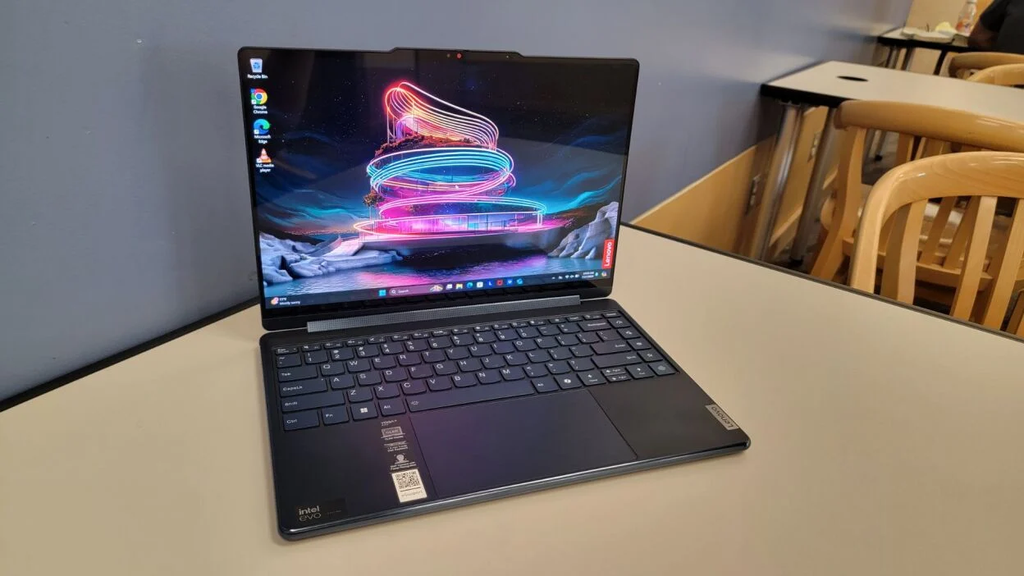
The Lenovo Yoga 9i 2-in-1 Aura Edition is the premium pick for a student who genuinely uses touch and pen input. The configuration checked on Amazon combines Intel Core Ultra 7 258V performance, 32GB LPDDR5X memory, a 14-inch 2.8K 120Hz OLED touchscreen, Wi-Fi 7, a 5MP IR camera, a 360-degree hinge, and Lenovo pen support in a chassis starting around 2.91 pounds.
The reason to spend this much is not nursing software performance; much cheaper laptops can run ordinary coursework. The value is workflow. You can fold it into tablet or tent mode, annotate lecture slides, handwrite diagrams, mark PDFs, or use the touchscreen during study without carrying a separate tablet. The OLED panel and high-resolution webcam also make it a strong remote-class and media machine.
Key Specs
These are the configuration details I would verify on the live listing before ordering. Amazon can group different configurations under very similar model names.
- Processor. Intel Core Ultra 7 258V.
- Memory. 32GB LPDDR5X.
- Storage. Amazon listing checked included a seller-upgraded 2TB SSD; factory configurations vary.
- Display. 14-inch 2.8K 2880×1800 OLED touchscreen, up to 120Hz.
- Mobility. 360-degree hinge, pen support, starting weight about 2.91 lb.
- Connectivity. Wi-Fi 7, Thunderbolt 4 / USB-C, USB-A, headphone jack.
Pros
The strengths below are the reasons this model earns its category recommendation rather than simply appearing because it is popular.
- Excellent note-taking flexibility. Touch, pen, tent and tablet modes support annotation-heavy study habits.
- Premium OLED display. Sharp text and diagrams with generous vertical workspace.
- 32GB RAM offers huge multitasking headroom. It is far beyond typical nursing requirements but useful for long ownership.
- Strong webcam and audio hardware. Good fit for remote lectures, interviews and video calls.
- Still portable for a premium convertible. It stays near three pounds despite the 360-degree design.
The strengths are most valuable when they match the way the student actually studies, carries, and charges the laptop.
Cons
No laptop is the best fit for every program or budget, so these are the trade-offs I would check before buying.
- Expensive for nursing coursework. Most students do not need 32GB RAM or a premium OLED convertible.
- Seller-upgraded SSD needs warranty scrutiny. The 2TB Amazon listing is not a simple untouched factory configuration.
- Glossy touchscreen can reflect classroom lighting. A matte clamshell may be more comfortable in some bright rooms.
Final Verdict: Buy the Yoga 9i if you know you will use the pen and convertible modes every week. If you mainly type papers and read PDFs, the ASUS gives a more economical premium experience without paying for a 360-degree workflow.
4. Apple MacBook Air 13-inch M5 – Best MacBook for Nursing Students
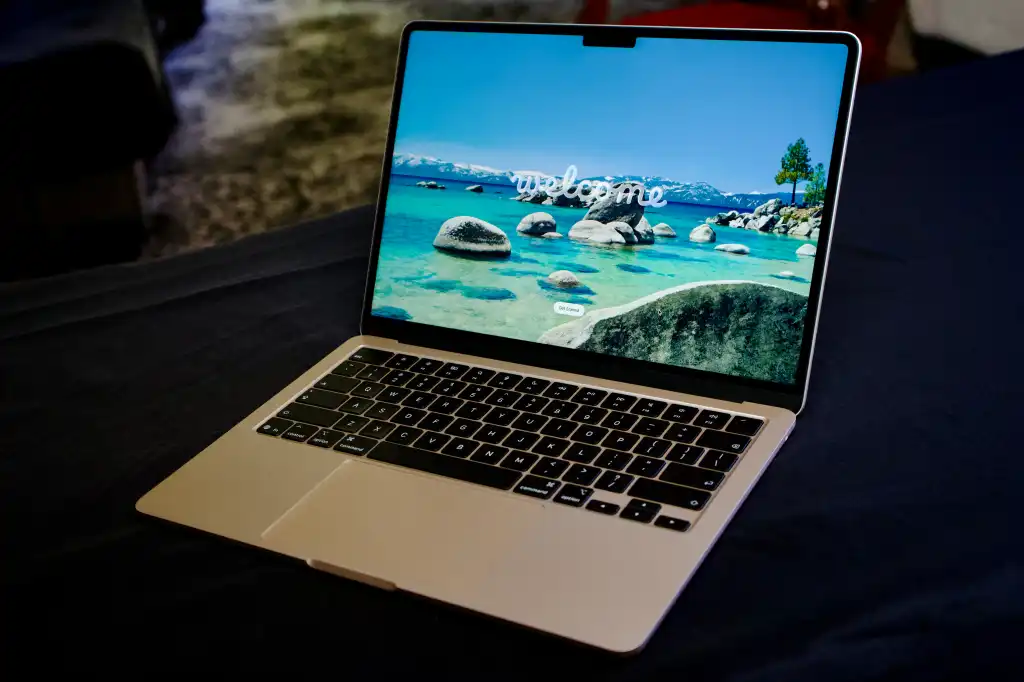
The 13-inch MacBook Air with Apple M5 is the cleanest macOS recommendation for a nursing student whose program explicitly supports Mac. The current 2026 base configuration starts at 16GB unified memory and 512GB SSD, with a 13.6-inch 2560×1664 Liquid Retina display, a 12MP Center Stage camera, MagSafe charging, two Thunderbolt 4 ports, Wi-Fi 7, and Apple’s fanless thin-and-light design.
For writing, research, PDFs, remote classes, browser-based portals, and general productivity, the MacBook Air is fast, quiet, and easy to carry. Apple rates the M5 Air for up to 18 hours of video streaming and up to 15 hours of wireless web in controlled testing, but I would still plan for lower real-world figures under video calls, high brightness, and mixed multitasking. The only reason I do not rank it first overall is software compatibility risk in programs that expect Windows.
Key Specs
These are the configuration details I would verify on the live listing before ordering. Amazon can group different configurations under very similar model names.
- Processor. Apple M5 with 10-core CPU; GPU configuration varies.
- Memory. 16GB unified memory standard.
- Storage. 512GB SSD standard on the 2026 M5 model.
- Display. 13.6-inch 2560×1664 Liquid Retina, 500 nits.
- Camera / wireless. 12MP Center Stage camera and Wi-Fi 7.
- Ports. MagSafe 3, 2× Thunderbolt 4 / USB-C, headphone jack.
Pros
The strengths below are the reasons this model earns its category recommendation rather than simply appearing because it is popular.
- Excellent battery efficiency. The fanless Apple silicon platform is strong for long mobile study days.
- Very portable. The 13-inch Air is designed for frequent carrying and small desks.
- Strong display and webcam. Text, lectures, and video calls look polished.
- 16GB/512GB base configuration is sensible. There is less pressure to pay for an immediate memory or storage upgrade.
- Quiet operation. No cooling fan means no fan noise in quiet study areas.
The strengths are most valuable when they match the way the student actually studies, carries, and charges the laptop.
Cons
No laptop is the best fit for every program or budget, so these are the trade-offs I would check before buying.
- macOS may not match school software. Verify exam, simulation, VPN, and peripheral compatibility before buying.
- Only two Thunderbolt ports. Older USB-A accessories or HDMI displays usually need an adapter or hub.
- Memory and storage are not user-upgradable. Choose the configuration carefully at purchase.
Final Verdict: If your nursing program fully supports macOS, the M5 MacBook Air is one of the easiest laptops to live with for four years of study. If your school is vague about compatibility, I would choose a Windows model first rather than gambling on workarounds.
5. HP OmniBook 7 Aero 13-bg1000nr – Best Lightweight Laptop for Clinical Days and Commuting

The HP OmniBook 7 Aero is the model I would prioritize for a student who carries a laptop constantly. The Amazon 13-bg1000nr configuration uses an AMD Ryzen AI 5 340, 16GB LPDDR5X memory, 512GB SSD, Radeon 840M graphics, Windows 11, and a 13.3-inch 1920×1200 IPS display, all in a chassis around 2.2 pounds.
HP also gives this series a useful set of ports for something this light: two USB-C ports, two USB-A ports, HDMI 2.1, and a headset jack are available across the 13-bg1000 family. A 5MP IR webcam is another practical advantage for remote classes and Windows Hello. The compromise is the smaller screen, but I would accept that trade if the laptop moves between home, campus, library, and clinical-related study locations every day.
Key Specs
These are the configuration details I would verify on the live listing before ordering. Amazon can group different configurations under very similar model names.
- Processor. AMD Ryzen AI 5 340, 6 cores / 12 threads.
- Memory. 16GB LPDDR5X-7500 onboard.
- Storage. 512GB PCIe Gen4 NVMe SSD.
- Display. 13.3-inch 1920×1200 IPS, anti-glare, 400-nit-class option.
- Graphics / camera. Radeon 840M and 5MP IR webcam.
- Weight. About 2.2 lb for the U.S. 13-bg1000nr configuration.
Pros
The strengths below are the reasons this model earns its category recommendation rather than simply appearing because it is popular.
- Exceptionally easy to carry. Around 2.2 pounds is a real advantage in a full school bag.
- Good 16GB/512GB baseline. You are not sacrificing the memory and storage target to get low weight.
- Useful port selection. USB-A and HDMI are unusually practical on a thin 13-inch laptop.
- Anti-glare IPS display. Potentially easier in bright classrooms than glossy OLED touchscreens.
- Strong webcam for its class. A 5MP IR camera is useful for calls and Windows Hello.
The strengths are most valuable when they match the way the student actually studies, carries, and charges the laptop.
Cons
No laptop is the best fit for every program or budget, so these are the trade-offs I would check before buying.
- Small 13.3-inch workspace. Students who live in side-by-side spreadsheets and PDFs may prefer 14 or 15 inches.
- Onboard RAM. The 16GB memory is not a normal later upgrade.
- Not a premium OLED or 2-in-1. It is optimized for portability rather than display wow factor or pen use.
Final Verdict: For a commuter, the OmniBook 7 Aero may be the most practical laptop in this guide. It gives up screen size before it gives up memory, storage, ports, or Windows compatibility, which is exactly the trade I want in an ultralight school machine.
Windows vs. Mac vs. Chromebook for Nursing School

Operating-system compatibility can eliminate a laptop before price or performance matters. I would never tell a nursing student to buy a MacBook or Chromebook without checking the program’s actual software list.
Windows remains the broadest general-purpose choice for legacy desktop software and accessories. macOS is excellent when officially supported. ChromeOS can be a very good browser-first platform, but it is the highest-risk choice when a school uses native Windows or Mac testing software, specialized drivers, or applications that are not fully web based.
For a deeper OS decision, read my Chromebook vs. Windows Laptop 2026 guide before choosing a Chromebook for nursing school.
Is a 2-in-1 Laptop Worth It for Nursing Students?
A 2-in-1 can be excellent if you already know you study by handwriting, annotating lecture slides, drawing anatomy diagrams, or reading in tablet mode. In that workflow, the Lenovo Yoga 9i replaces part of what a separate tablet would do and keeps your files in one Windows system.
If you mostly type, a standard clamshell usually gives better value and may be lighter or simpler. Do not pay hundreds of dollars for a 360-degree hinge that stays in laptop mode for four years.
Are Refurbished Laptops Good for Nursing Students?
They can be, especially when budget is tight, but “refurbished” is not a universal quality grade. I want a documented condition, battery-health information where possible, a supported operating system, a correct charger, a meaningful return window, and a written warranty.
For a school-critical device, I would rather buy a slightly slower refurbished laptop from a strong program than a faster marketplace unit with unknown battery condition and no practical return protection.
Use the condition-checking principles in my refurbished laptop buying guide even though that article focuses on gaming laptops. Battery health, seller protection, exact hardware, and returns still apply.
Best Laptops for Nursing Students by Budget
Laptop prices move constantly, especially on Amazon, so I do not build the recommendation around a price that may disappear tomorrow. Instead, I set a budget band and protect the hardware minimums first.
If spending more does not improve compatibility, portability, display comfort, battery behavior, warranty, or a feature you will actually use, keep the money for a protective sleeve, backup drive, USB-C charger, external monitor, or other school costs.
Under $500
At this level, prioritize 16GB RAM and 512GB SSD when a sale makes that possible, even if the chassis and display are basic. If new hardware becomes too compromised, a clearly graded refurbished business laptop can be a better long-term tool when battery health, Windows support, warranty, and returns are documented.
$500 to $1,000
This is the sweet spot for most nursing students. You can usually find 16GB/512GB Windows laptops with good screens, better webcams, lighter designs, USB-C charging, and more reliable battery life without paying for professional graphics.
Above $1,000
Spend above $1,000 only when a premium feature changes your workflow: an exceptionally light chassis, OLED touchscreen, pen support, MacBook battery efficiency, premium webcam, 32GB memory, or a design you expect to keep beyond graduation.
Common Laptop Buying Mistakes Nursing Students Should Avoid
Most bad purchases are not caused by choosing the wrong brand. They happen because the buyer skips program compatibility, buys the wrong configuration, or optimizes for a specification that does not matter during everyday coursework.
- Buying before checking required software. A laptop can be powerful and still fail a proctoring, simulation, or specialty application requirement.
- Choosing 8GB RAM only to save a small amount. If the memory is soldered, that decision follows you for the entire life of the laptop.
- Assuming all listings with the same model name are identical. Amazon can show multiple CPUs, screens, RAM capacities, SSD sizes, and sellers under closely related titles.
- Buying a Chromebook because all coursework “looks web based.” Testing software, VPNs, peripherals, and local applications may still create compatibility problems.
- Buying a MacBook without explicit macOS support. Do not build your semester around virtualization or workaround software unless the school approves it.
- Ignoring charger and total carry weight. A lightweight laptop with a heavy adapter can erase part of the portability advantage.
- Paying for a gaming GPU you do not need. Dedicated graphics add cost, heat, weight, and battery demand without helping normal nursing coursework.
- Ignoring webcam and microphone quality. Remote classes, office hours, interviews, and proctoring can expose a weak camera faster than normal browsing.
- Treating advertised battery life as guaranteed. Real usage depends on brightness, calls, apps, background processes, network conditions, and battery age.
- Skipping seller and warranty checks. Marketplace upgrades and third-party sellers can change who is responsible when something fails.
My final pre-purchase check is simple: exact configuration, school compatibility, seller, return period, warranty, weight, ports, and whether the laptop solves my real study workflow. If one of those is unclear, I do not rush the order.
How to Choose the Right Laptop for Your Nursing Program

Use this process before comparing prices. It keeps the decision tied to school requirements and prevents a deal from overriding a compatibility problem.
Step 1: Download the school technology requirements
Look for supported operating systems, testing software, webcam rules, browser versions, VPNs, and minimum specifications.
Step 2: Choose Windows, macOS, or ChromeOS
If the school does not clearly support a platform, ask before buying it.
Step 3: Set 16GB RAM and 512GB SSD as the default target
Reduce those only when budget or an explicit school recommendation justifies it.
Step 4: Decide how often you will carry the laptop
Daily commuters should prioritize weight and charger size; desk-heavy students can choose a larger display.
Step 5: Decide whether touch and pen support are real needs
Buy a 2-in-1 only if annotation or tablet mode will be part of your routine.
Step 6: Check the exact retailer configuration
Verify model number, CPU, RAM, storage, screen, condition, seller and warranty rather than relying on the family name.
Step 7: Keep room in the budget for ownership
A sleeve, USB-C charger, adapter, external drive, mouse or monitor may improve the experience more than a small CPU upgrade.
Following these steps usually narrows dozens of laptops down to two or three sensible choices. At that point, keyboard feel, screen size, weight, and price can make the final decision.
Final Verdict: Which Laptop Should a Nursing Student Buy in 2026?
For most nursing students, I would buy the ASUS Zenbook 14 OLED because it gives the best balance of Windows compatibility, 16GB memory, 512GB storage, strong everyday performance, low weight, a sharp 16:10 screen, and useful ports. If money matters more than portability, the Acer Aspire Go 15 is the sensible value choice. If handwritten notes and tablet mode are central to the way you study, the Lenovo Yoga 9i is the premium 2-in-1 worth considering.
The MacBook Air M5 is an excellent long-term laptop when your program confirms macOS support, while the HP OmniBook 7 Aero is the pick I would make for maximum portability. Whichever model you choose, verify the school requirements and the exact Amazon configuration before ordering. That compatibility check matters more than any ranking in this guide.
More GearVerdicts laptop guidance: Chromebook vs Windows • Refurbished Laptop Buying Guide • Budget Laptop Options • Editorial Policy
Frequently Asked Questions
Nursing school does not usually require a gaming or workstation laptop, but software compatibility and local program rules can change the answer. These FAQs are a starting point, not a substitute for your school’s published technology requirements.
How much RAM does a nursing student need?
I recommend 16GB for a new laptop in 2026. 8GB can still handle light coursework, but 16GB gives more headroom for browser tabs, video calls, Office, PDFs, and several years of software updates.
Is 256GB storage enough for nursing school?
It can be, especially with cloud storage, but I prefer 512GB because it leaves more comfortable room for applications, local files, recordings, downloads, and future coursework.
Do nursing students need an Intel Core i7 or Ryzen 7?
No. Normal nursing coursework does not require a high-tier processor. A modern mainstream Core Ultra, Ryzen 5/7, Apple M-series, or comparable chip is usually more than enough.
Is a MacBook good for nursing school?
Yes if the program explicitly supports macOS and all required applications. If the school uses Windows-only software or peripherals, a Windows laptop is the safer choice.
Can nursing students use a Chromebook?
Sometimes. A Chromebook is a good browser-first machine, but it can be unsuitable when the program requires Windows/macOS desktop apps, specialty drivers, or unsupported proctoring software.
Is a 2-in-1 laptop useful for nursing students?
Yes for students who regularly handwrite notes, annotate slides, or use tablet mode. It is optional for students who mainly type.
What screen size is best for nursing school?
I like 13 to 14 inches for frequent carrying and 15 inches for students who value larger text and split-screen workspace more than low weight.
How important is battery life?
Very important if you study away from outlets, but use manufacturer claims only as a comparison. Real battery life changes with brightness, video calls, apps, network conditions and age.
Should I buy a refurbished laptop for nursing school?
A good refurbished laptop can be excellent value when the exact configuration, battery condition, Windows support, seller, return period and warranty are clear.
Do I need a touchscreen?
No. A touchscreen is a workflow preference, not a standard nursing-school requirement. Buy it if you will use annotation or tablet-style navigation.
What is the best budget laptop for nursing students?
Among the five picks in this guide, the Acer Aspire Go 15 is the value-focused option because the checked Amazon configuration includes Ryzen 7, 16GB RAM and 512GB SSD.
What should I check immediately after the laptop arrives?
Confirm the exact CPU, RAM and SSD, run operating-system updates, test Wi-Fi, webcam, microphone, keyboard, trackpad, charging, ports and battery behavior, then install the school’s required software while you are still inside the return window.